---
title: How to Install Schema.org Markup to Your WordPress Business Site - Clickx
description: Schema.org optimizes your site for many of Google's new ranking positions. Here are a few ways you can add Schema.org to your business WordPress site!
image: https://info.clickx.io/hubfs/Imported_Blog_Media/How-to-Install-Schema_org-Markup-to-Your-WordPress-Business-Site-1040-700-b-1024x689-1.jpg
---
**Start Landing Clients in 30 days or Less [](https://cta-redirect.hubspot.com/cta/redirect/5862065/3739dd1c-9219-455d-b4aa-1f5af32f1eb6)**
[](http://clickx.io)
[Login](https://app.clickx.io/)
[Apply Now](https://info.clickx.io/follow-up)
# How to Install Schema.org Markup to Your WordPress Business Site
[Solomon](https://info.clickx.io/blog/author/solomon)
Solomon Thimothy has been helping small and medium businesses generate leads and acquire customers since 2006, focusing on strategies that drive exponential growth. His mission is to help businesses think bigger, scale faster, and achieve 10X success.
Do you remember the old days, where you simply had to *own* a website to be ahead of the game? Nowadays, it seems as though there are too many technology trends to keep up with. In some cases, we get away with ignoring them until they go away—Schema.org is not one of those ignorable trends.
For all the changes in Search Engine Optimization (SEO) over the years, it still has a clear core of semantic and contextual search. That begs the question: How exactly can search engines can create this kind of context? Quite often, the answer involves [Schema.org](http://schema.org/).
In this post, we will explain what Schema.org is, and explore your options for installing it on your business’ WordPress website. Let’s get to it!

### Key Takeaways
1. Schema.org is a markup that creates semantic context for Google and other search engines.
2. Adding Schema.org markup is the first optimization step for many of Google’s new ways to rank in search.
3. There are several WordPress plugins, free and premium, that make incorporating Schema.org markup a cinch.
## What Schema.org Is and Why It’s Important
[Schema.org](http://schema.org/) is a Google-sponsored collaborative community with a mission to create semantic context for different types of online content. It helps search engines determine what’s what by identifying entities and relationships for content on a webpage.
\[Tweet “Schema.org creates semantic context for different types of online content.”\]
Of course, Google often releases [new ways to rank](https://moz.com/blog/mega-serp-a-visual-guide-to-google) in search results, and Schema.org is often the first step towards leveraging many of those ranking positions.
## How to Add Schema.org Markup to Your WordPress Business Site
Admittedly, Schema.org sounds technical—and it is if you’re starting from scratch. While adding it to WordPress feels overwhelming at first, the truth is different. Here are three trusty WordPress plugins that can help with the heavy lifting for you, along with our advice for getting up and running.
### Option 1: [Schema](https://wordpress.org/plugins/schema/)
### 
[Schema](https://wordpress.org/plugins/schema/) is a fast, lightweight plugin for adding [Schema.org](http://schema.org/) markup to WordPress sites. This plugin runs automatically in the background, which means you can install it, then forget about it forever. It’s free, effective, and follows best-practice guidelines.
As a bonus, the developers have tested it alongside popular plugins and themes such as [Yoast SEO](https://wordpress.org/plugins/wordpress-seo/), [AMP](https://wordpress.org/plugins/amp/), [Divi](https://www.elegantthemes.com/gallery/divi/), and [Genesis](http://my.studiopress.com/themes/genesis/).
#### Pros:
- Uses JSON-LD, which is [Google’s recommended format](https://developers.google.com/search/docs/guides/intro-structured-data#markup-formats-and-placement).
- Set and forget functionality.
- Tested for use with popular plugins and themes. Check the [official plugin page](https://wordpress.org/plugins/schema/) for a complete, up-to-date list.
#### Cons:
- Output can be customized on a post-by-post basis, but it takes some extra leg work.
#### How to Use the Schema Plugin
Schema is simple to use, and only needs a small portion of your business information. [Once installed](https://codex.wordpress.org/Managing_Plugins#Automatic_Plugin_Installation), navigate to the [*Settings* page](https://schema.press/docs/settings/) on your WordPress dashboard, then fill in any relevant information on the *General*, *Knowledge Graph*, and *Search Results* tabs:
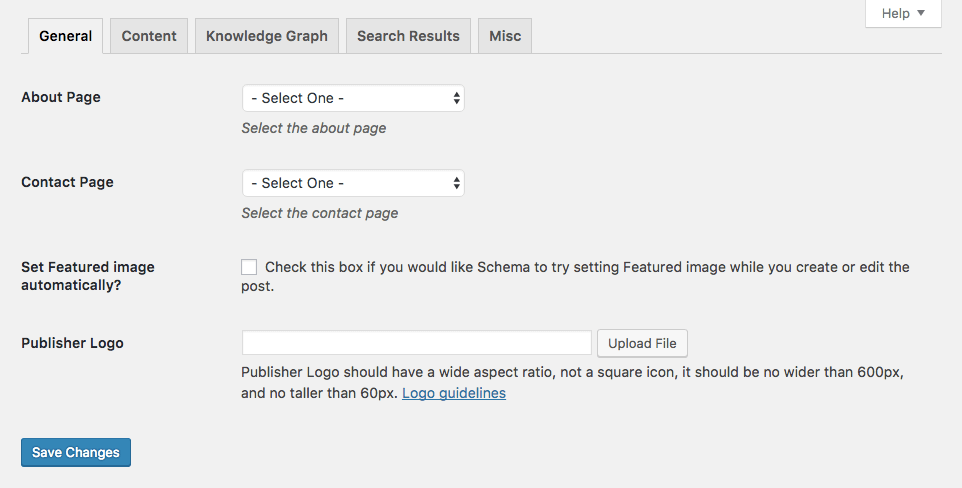
There’s plenty of functionality to be found in this plugin, much of which is outside the scope of this article. For detailed instructions and advanced usage, view the [official project homepage](https://schema.press/).
### Option 2: [All in One Schema.org Rich Snippets](https://wordpress.org/plugins/all-in-one-schemaorg-rich-snippets/)

The [All In One Schema.org Rich snippets](https://wordpress.org/plugins/all-in-one-schemaorg-rich-snippets/) plugin generates front-facing content to optimize for [Google Rich Snippets](https://developers.google.com/search/docs/guides/enhance-site). It can optimize a page for star ratings, author photos, images, and more. If your content holds a wide variety of detailed elements such as recipes, products, or events, this may be the right choice for you.
On the back end, you’ll add rich snippet information for each page. On the front end, this will display a neat table that viewers can see, which could also result in rich snippets displaying for your listing in search results:
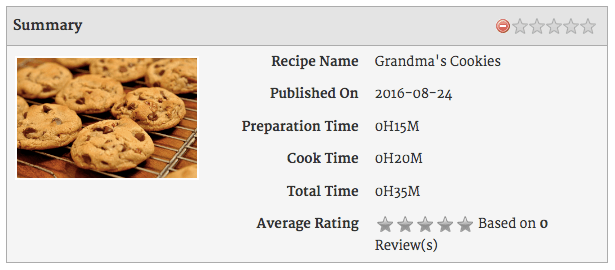
However, while this plugin’s functionality is solid, it hasn’t seen any recent updates. It performed well in our tests, although it may not work in your version of WordPress—or for future versions.
#### Pros:
- Helps you optimize for Google Rich snippets.
- Easy to use interface.
- Popular with over 40,000 users.
#### Cons:
- Displays extra (arguably ugly) content on the visible page, ditching support for JSON-LD.
- Doesn’t automatically add Schema.org markup throughout your site, so you must add it page by page.
- Potential to not work with future versions of WordPress.
#### How to Use the All In One Schema.org Rich Snippets Plugin
The All In One Schema.org Rich Snippets plugin is fairly straightforward, although it’s not an automatic process. Simply installing it isn’t enough—you’ll need to add it manually on every page. Fortunately, it’s pretty easy to do. Once installed, start editing a page you want to add Schema.org markup to. Next, use the *Configure Rich Snippet* meta box to add information about your page, before saving your changes:
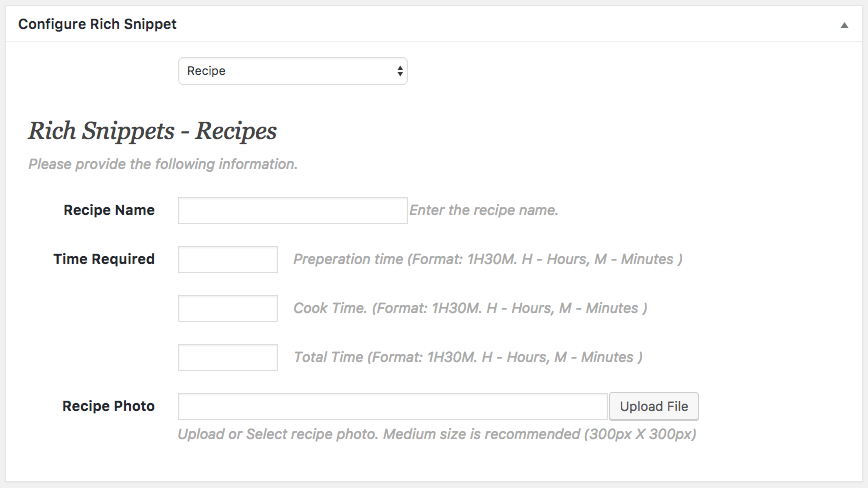
Much like the Schema plugin, All In One Schema.org Rich Snippets has a lot of functionality to get to grips with. To delve deeper into its functionality, [check out this beginner’s tutorial](http://www.wpbeginner.com/beginners-guide/beginners-guide-how-to-use-rich-snippets-in-wordpress/).
### Option 3: [Schema App Structured Data](https://wordpress.org/plugins/schema-app-structured-data-for-schemaorg/)

[Scheme App Structured Data](https://wordpress.org/plugins/schema-app-structured-data-for-schemaorg/) optimizes your pages and posts with Schema.org markup by using the information already saved in your WordPress site. You can also optionally enable several [Google Site Structure](https://developers.google.com/search/docs/guides/enhance-site#add-your-sites-name-logo-and-social-links) features from its setting page.
However, bear in mind that while this plugin is free, there are a number of [premium features](https://www.schemaapp.com/product-pricing/#premium-support) including email support, video tutorials, and semantics analytics starting at $57 per month.
#### Pros:
- Uses JSON-LD, the recommended markup format.
- Set and forget, with no configuration required.
- Can integrate with WooCommerce—for a price.
#### Cons:
- Requires connection to [SchemaApp.com](https://www.schemaapp.com/), even to access all the free features.
- Some features have a cost attached, unlike its competitors.
#### How to Use the Schema App Structured Data Plugin
For basic usage, all you need do is install the plugin. For detailed instructions on using it in conjunction with an account with Schema App, you’ll want to read the official manual.
## Conclusion
[Schema.org](http://schema.org/) is the first step in getting your site listed for many of the [new ranking positions](https://moz.com/blog/mega-serp-a-visual-guide-to-google) in Google. Failing to install Schema.org markup on your website could impact the traffic you receive, and your overall search engine ranking.
Seeing as it’s so easy to do, there are several ways to add Schema.org markup to WordPress without breaking a sweat. You can use any of the top three Schema.org plugins:
1. **[Schema](https://wordpress.org/plugins/schema/):** A completely free set and forget option for adding markup to your website.
2. **[All In One Schema.org Rich Snippets](https://wordpress.org/plugins/all-in-one-schemaorg-rich-snippets/):** A good option if you have a lot of unique content that needs customization throughout your site.
3. **[Schema App Structured Data](https://wordpress.org/plugins/schema-app-structured-data-for-schemaorg/):** Best if you’ll need extended features, and are willing to upgrade to a premium version.
Do you have a preferred method of adding Schema.org to a WordPress site? Let us know about your top choice in the comments section below!
## You May Also Like
[](https://info.clickx.io/blog/different-ways-your-business-site-rank-google)
### [6 Different Ways Your Business Site Can Rank in Google](https://info.clickx.io/blog/different-ways-your-business-site-rank-google)
[](https://info.clickx.io/blog/add-business-contact-details-schema-seo)
### [How to Add Your Business Contact Details in Schema for SEO](https://info.clickx.io/blog/add-business-contact-details-schema-seo)
[](https://info.clickx.io/blog/emulate-big-budget-marketing)
### [Small Businesses: How to Emulate Big Budget Marketing at a Fraction of the Cost](https://info.clickx.io/blog/emulate-big-budget-marketing)
### EXPLORE +
- [About](https://info.clickx.io/about)
- [Partners](https://info.clickx.io/platform)
- [Contact Us](https://info.clickx.io/contact-us)
- [Media](https://info.clickx.io/media)
- [Podcast Appearances](https://info.clickx.io/podcast)
- [Careers](https://info.clickx.io/careers)
- [Internships](https://careers.clickx.io)
- [Sell Agency](https://info.clickx.io/sell-agency)
- [Start My Agency](https://info.clickx.io/start-agency)
- [Scale My Agency](https://info.clickx.io/scale-agency)
- [Grader](http://www.clickx.io/grader)
### SERVICES +
- [Digital Marketing](https://info.clickx.io/white-label-digital-marketing)
- [Web Design & Development](https://info.clickx.io/white-label-web-design-development)
- [Meta Ads](https://info.clickx.io/white-label-meta-ads)
- [Facebook Ads](https://info.clickx.io/white-label-facebook-ads)
- [Google Ads Services](https://info.clickx.io/white-label-google-ads-services)
- [PPC Services](https://info.clickx.io/white-label-ppc-services)
- [LinkedIn Ads](https://info.clickx.io/white-label-linkedin-ads)
- [Link Building](https://info.clickx.io/white-label-link-building)
- [SEO](https://info.clickx.io/white-label-seo)
- [Funnel Design](https://info.clickx.io/white-label-funnel-design)
- [Landing Pages](https://info.clickx.io/white-label-landing-pages)
### Solutions +
- [Agency Solutions](https://info.clickx.io/agency-solutions)
- [Agency Lead Generation](https://info.clickx.io/lead-generation)
- [Franchise Marketing](https://info.clickx.io/franchise-marketing)
- [Direct Mail Printers](https://info.clickx.io/direct-mail-printers)
- [Commission Only Closers](https://info.clickx.io/commission-only-closers)
- [Commission Only Appointment Setters](https://info.clickx.io/commission-only-appointment-setter)
### RESOURCES +
- [Clickx Demo](https://info.clickx.io/demo-0)
- [SEO Grader](https://info.clickx.io/seo-grader)
- [ROI Calculator](https://info.clickx.io/roi-calculator)
- [SERP Preview Tool](https://info.clickx.io/serp-preview-tool)
- [Blog](https://info.clickx.io/blog)
- [Agency Scale Calculator](https://info.clickx.io/agency-scale-calculator)
- [Our Partners](https://app.clickx.io/p/technology-partners)
- [Assessment](https://info.clickx.io/assessment)
- [On-Demand Training](https://info.clickx.io/on-demand-training)
- [Unlimited Leads](https://info.clickx.io/unlimited-leads)
- [Success Path](https://info.clickx.io/success-path)
- [Become A Contractor](https://network.clickx.io/)
#### Clickx | The AI Growth System for Coaches, Consultants, and B2B Businesses

#### Sales
[888-909-7265](tel:+18889097265)
#### Text
[312-766-4656](tel:+13127664656)
#### Community
-
-
-
-
-
-
-
-
#### Chicago 🇺🇸
110 North Wacker Drive
Suite 2500
Chicago, IL 60606
#### Florida 🇺🇸
**South West Florida**
3301 Bonita Beach Rd SW
Bonita Springs, FL 34134
#### Canada 🇨🇦
**Downtown Toronto**
240 Richmond Street W
Toronto ON M5V 1V6
#### United Kingdom 🇬🇧
**London, UK**
2 Eastbourne Terrace
London W2 6LG
2026 Clickx – SCALE Sales & Marketing Systems. All Rights Reserved.
Made in Chicago
- [Privacy Policy](https://info.clickx.io/privacy-policy)
- [Terms](https://info.clickx.io/terms)
- [Disclosure](https://info.clickx.io/google-disclosure-notice)
```json
{
"@context" : "https://schema.org",
"@type" : "BlogPosting",
"author" : {
"@type" : "Person",
"name" : "Solomon",
"url" : "https://info.clickx.io/blog/author/solomon"
},
"dateModified" : "2024-08-12T08:07:15.749Z",
"datePublished" : "2016-12-12T10:30:12.000Z",
"headline" : "How to Install Schema.org Markup to Your WordPress Business Site - Clickx",
"image" : [ "https://info.clickx.io/hubfs/Imported_Blog_Media/How-to-Install-Schema_org-Markup-to-Your-WordPress-Business-Site-1040-700-b-1024x689-1.jpg" ],
"mainEntityOfPage" : {
"@id" : "https://info.clickx.io/blog/how-to-install-schema-on-your-wordpress-site",
"@type" : "WebPage"
},
"publisher" : {
"@type" : "Organization",
"logo" : {
"@type" : "ImageObject",
"url" : "https://info.clickx.io/hubfs/clickx-logo-white.svg"
},
"name" : "Clickx"
}
}
```